

Nearly half of all Google searches have local intent. In fact, Google’s own research shows that 76% of people who search for something nearby on their smartphone visit a business within a day, while 28% make a purchase.
Think about how you choose a local business. You search Google, glance at reviews, compare profiles, and make a decision – often before you’ve even visited a website.
Your customers do exactly the same.
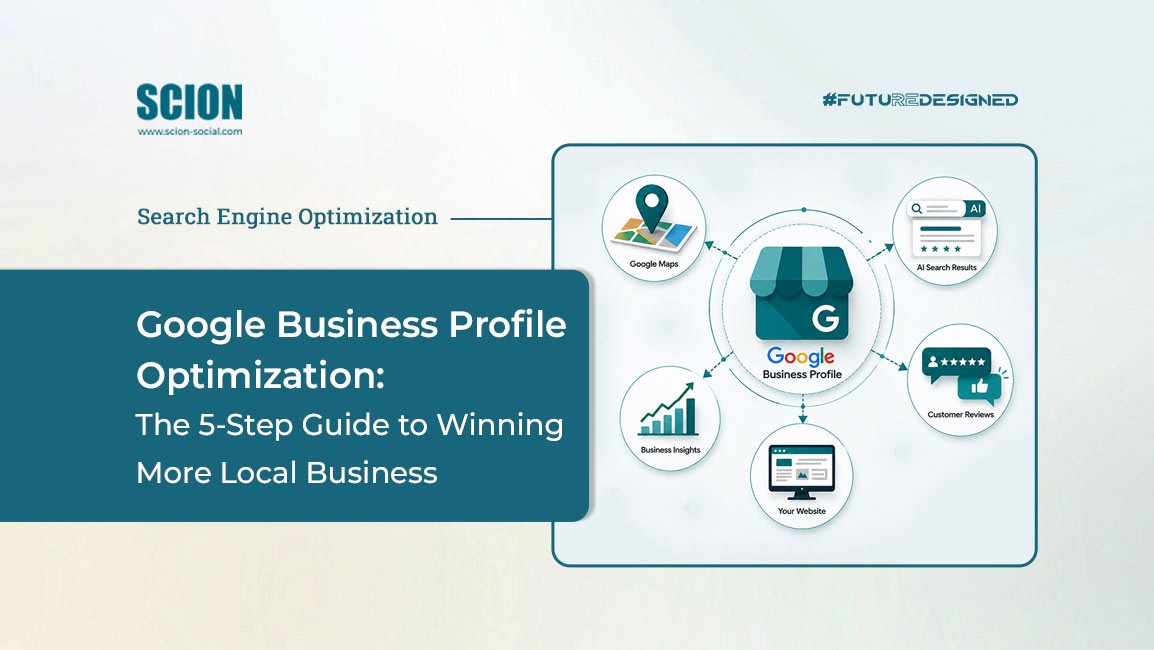
That’s why Google Business Profile optimization has become one of the most important parts of local SEO for small business. Your profile is no longer just an online listing. It’s your digital shopfront, your first impression, and often the deciding factor in whether someone chooses you over your competitor.
It’s also becoming increasingly important for AI-powered search. As Google continues to roll out AI Overviews, complete and trustworthy Google Business Profiles give Google more confidence when deciding which businesses to recommend and reference.
In this guide, we’ll walk through practical steps showing you how to optimize your Google Business Profile, improve your visibility on Google Search and Google Maps, and build trust with potential customers.
If you’re looking for more practical local SEO tips, our Local SEO Tips for B2B guide explores other ways to improve your visibility in local search.
Why an Optimized Profile Wins (and a Neglected One Hurts You)
Imagine two businesses offering exactly the same service in the same town.
One profile has a professional logo, recent photos, accurate opening hours, detailed service information, and dozens of positive reviews. The other has no description, outdated photos, limited information, and only a handful of reviews from several years ago.
Which business would you contact? Most people make that decision in seconds.
A well-optimized profile can help you:
- Appear more prominently in Google Search and Google Maps SEO results.
- Build trust before a customer even visits your website.
- Generate more phone calls, website visits, and direction requests.
- Increase your chances of appearing for high-intent searches, including near me searches. As more people use conversational searches on mobile devices and voice assistants, understanding Voice Search Optimization Strategies can help you capture even more local traffic.
- Strengthen the signals Google uses when deciding which businesses to surface in local search and AI-generated results.
The good news is that you probably don’t need a complete overhaul. Small improvements can make a big difference over time – and that’s exactly what we’ll cover next.
How to Optimize Your Google Business Profile
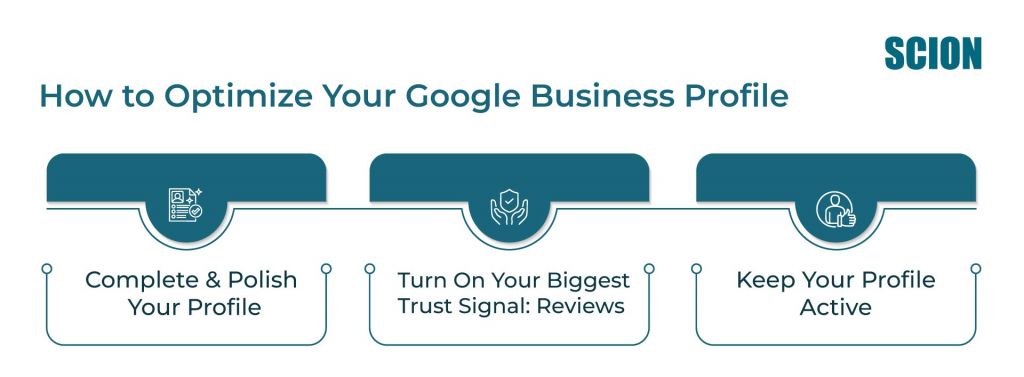
Now that you know why your Google Business Profile matters, let’s look at what you can do to improve it. It’s worth noting that verifying your business on Google is the first step before you can add your business name and information or interact with customers.
Step 1: Complete and Polish Your Profile
Your Google Business Profile should answer every question a potential customer might have before they decide to contact you. If information is missing, inconsistent, or out of date, you’re asking people to work harder than they need to. And in local search, convenience often wins.
Choose the Right Business Category
One of the first things Google looks at is how you’ve categorized your business.
Your primary category tells Google what your business does and which searches you should appear for. Secondary categories provide additional context and help you show up for related searches.
For example, if you’re a digital marketing agency, choosing “Marketing Agency” gives Google a much clearer understanding of your services than selecting a broader category like “Consultant.”
Take a few minutes to review your categories and ask yourself one question:
If I were searching for my own business, would these categories make sense?
Choosing the right Google Business Profile categories won’t guarantee higher rankings overnight, but it does give Google the information it needs to connect your business with the right searches.
Write a Description That Sounds Human
Your business description isn’t there to impress Google’s algorithm. It’s there to help real people understand what you do and why they should choose you.
Instead of filling it with keywords, explain your business in plain language. Think about:
- What you do
- Who you help
- What makes your business different
- Why someone should trust you
A clear, well-written business description also helps Google better understand your business, which supports your overall Google Business Profile optimization efforts.
If you’re unsure where to start, our Google Business Profile Optimization Guide takes a deeper look at writing descriptions, choosing categories, and optimizing every section of your profile for both customers and search engines.
If you’re making changes yourself, Google’s official Business Profile Help is also a useful resource for verifying features, troubleshooting issues, and following the latest best practices.
Make Sure Every Detail Is Accurate
This sounds obvious, but it’s surprising how many businesses overlook the basics.
Take five minutes to check:
- Your business name
- Phone number
- Website
- Opening hours
- Service areas
- Products or services
- Appointment links
- Contact details
Even small inaccuracies can create friction and cost you potential customers. Keeping your information accurate helps Google trust your business and gives customers confidence that they’ll find the right information when they need it.
Use Photos That Build Confidence
Photos don’t just make your profile more attractive; they help people picture themselves doing business with you. Here’s what you should include:
- Your logo
- A high-quality cover image
- Photos of your premises
- Your team
- Your products or services
- Customers enjoying the experience (where appropriate)
Fresh images also show that your business is active. While photos alone won’t move you to the top of Google, they contribute to a stronger, more complete profile, which is exactly what Google Business Profile optimization is all about.
Step 2: Turn On Your Biggest Trust Signal: Reviews
Once your profile is complete, it’s time to focus on the element most customers notice first: your reviews.
Think about your own behavior. When you compare two businesses offering the same service, chances are you look at their star rating before anything else.
Google looks at reviews in much the same way. They’re one of the clearest indicators that a business is active and trusted.
Apart from building trust with potential customers, strong Google reviews for business are also a major factor in Google Maps SEO, influencing both visibility and click-through rates.
So, if you’re wondering how to get more Google reviews, the answer isn’t to ask everyone all at once. It’s to build review requests into your everyday customer journey and consistently earn those 5-star reviews by delivering a great customer experience.
Make Asking for Reviews Part of Your Process
The best time to ask for a review is immediately after you’ve delivered value.
That might be:
- Completing a project
- Finishing a meeting
- Delivering a product
- Resolving a customer’s problem
It’s also important to make it as easy as possible. A direct review link or QR code gives customers a simple next step and, over time, these small moments build into a steady stream of authentic Google reviews.
Respond to Every Review
Collecting reviews is only half the job. Responding to them shows that you’re listening.
Thank customers for positive feedback. Acknowledge constructive criticism professionally. If someone has had a poor experience, respond calmly and explain how you’re addressing it. Potential customers often read business responses just as carefully as the reviews themselves, so how you respond says a lot about how your customers can expect to be treated.
Quality Matters More Than Quantity
Google wants to see that people are continuing to interact with your business. Ten recent reviews are often more valuable than fifty reviews collected five years ago.
Aim to create a steady rhythm rather than a short burst of activity. That’s a far more sustainable way to get more Google reviews and strengthen your Google Business Profile over time.
Step 3: Keep Your Profile Active
Like your website or social media channels, your Google Business Profile performs best when it’s kept up to date. A few small updates each month can help keep your profile fresh and relevant.
Share Updates About Your Business
Use Google Posts to publish updates directly to your Google Business Profile.
These might include:
- New products or services
- Company news
- Special offers
- Upcoming events
- Seasonal opening hours
Think of Google Posts as another opportunity to answer the question:
“Why should someone choose us today?”
Add New Photos Regularly
The photos you uploaded when you first created your profile shouldn’t be the last ones your customers see. Fresh images help people understand what your business looks like today.
Depending on your business, you could add photos of:
- Recent projects
- New products
- Your team
- Events
- Behind-the-scenes moments
- Happy customers (with permission)
These updates also reinforce trust. People like doing business with companies that feel current and engaged.
Answer Questions Promptly
Customers can ask questions directly through your Google Business Profile. Answering them promptly helps remove uncertainty and gives future customers the information they’re looking for. You’ll often find that if one person asks a question, plenty of others are wondering the same thing.
Review Your Profile Every Few Months
Businesses change and services evolve. That’s why it’s worth setting a reminder every few months to review your profile from a customer’s perspective.
Ask yourself:
- Is every detail still accurate?
- Are my opening hours correct?
- Do my photos reflect my business today?
- Have I added any new services?
- Have I replied to recent Google reviews?
These small check-ins take very little time, but together they strengthen your Google Business Profile optimization efforts and support your wider Google Maps marketing strategy.
What This Means for BNI: A Worked Example
For National Directors and Executive Directors, your BNI Region Profile is often how potential members and visitors discover your region on Google Search and Google Maps. A complete, active profile helps build trust before someone even visits your website or attends a chapter meeting.
We’ll use BNI India as example. Simply follow the same process for your own region.
Step-by-Step: Audit Your BNI Region Profile
Log in to your BNI region’s Google Business Profile (or claim it if you haven’t yet) using your regional BNI domain email. Take a look at Google’s own guidance for claiming your Business Profile here.
Step 1: Search for Your Region
Search for your region on Google (for example, BNI India or BNI [Your City]) and see what appears in Google Search and Google Maps.
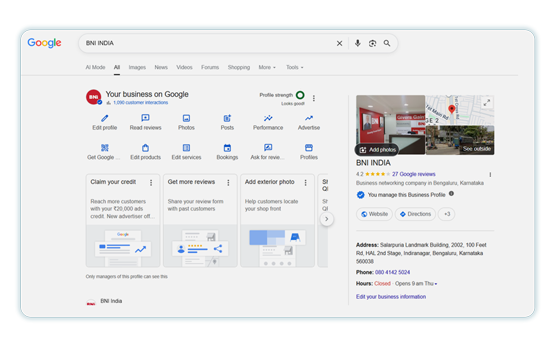
This gives you a clear picture of what prospective members see when they search for your region.
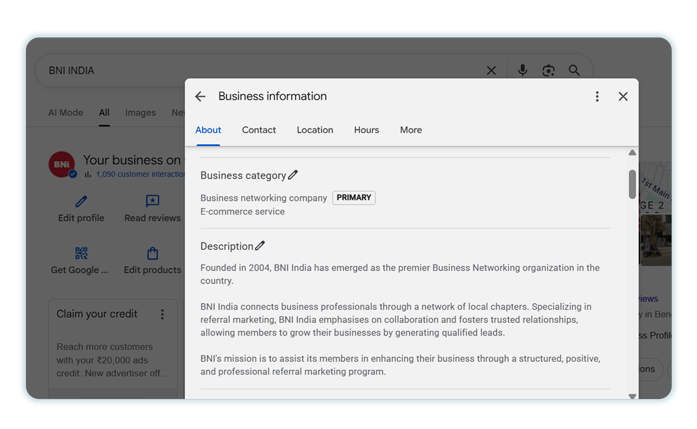
Step 2: Check Your Profile Completeness
Review your:
- Logo
- Business name
- Description
BNI India, for example, uses its official logo together with a clear description of the organization and what it offers.
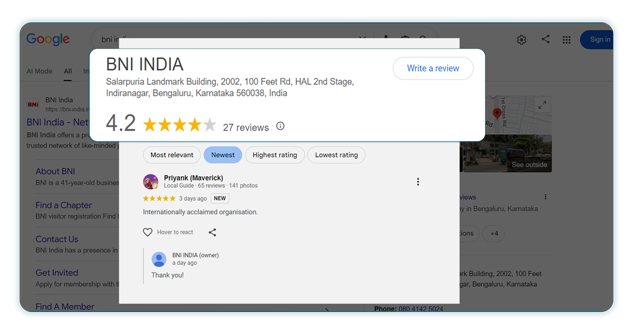
Step 3: Review Your Reviews
Count your current Google reviews and read the most recent ones. If you have fewer than five reviews, make that your first priority.
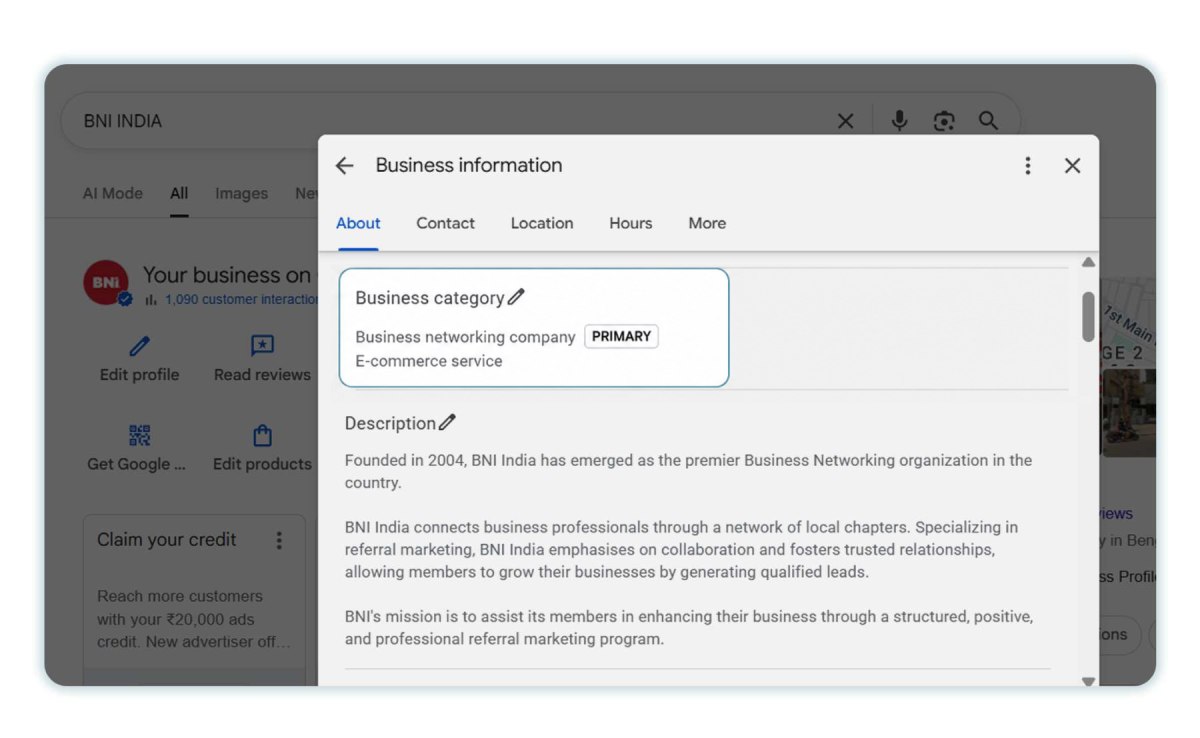
Step 4: Verify Your Categories and Service Area
Check that your business categories accurately describe your region and that your service area reflects the area you cover.
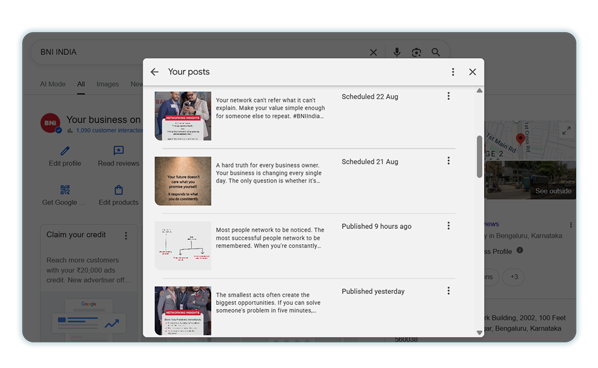
Step 5: Review Your Recent Posts and Photos
Look at your recent posts and photos.
Have you shared chapter meetings, member spotlights, or recent events? If not, now is a good time to update them.
Next: Share the Chapter Review Ask
Once your BNI region profile is complete and up to date, start sharing it with the people you want to reach. Encourage members, visitors, customers, and your wider network to explore the profile, find the information they need, and engage with your region on Google. An optimised profile is most effective when it stays visible, active, and easy to discover.
Take Your Digital Marketing Further
Optimizing your Google Business Profile is one way to improve your visibility online. If you’re a BNI member looking for practical support with the rest of your digital marketing, Scion’s Social Media AI Accelerator gives you everything you need to run your social media: ready-to-use content, tools, templates, and support – all delivered monthly.

Social Media for BNI Markets. Sorted.
Everything you need to run your social media: ready-to-use content, tools, templates, and support. Delivered monthly.

Conclusion
Your Google Business Profile is often the first conversation a potential customer has with your business. Before they visit your website, call you, or request a quote, they’re already deciding whether they trust you.
The businesses that stand out aren’t always the biggest or the most established. More often, they’re the ones that make it easy for customers – and Google – to understand who they are, what they do, and why they’re worth choosing.
The steps we’ve covered in this guide won’t transform your visibility overnight, but together they create a stronger foundation for Google Business Profile optimization. They help you build trust, improve your presence in Google Search and Google Maps, and put your business in a better position to attract local customers.
As AI-powered search continues to evolve, complete and trustworthy Google Business Profiles will become even more valuable. Investing a little time today can help your business stay visible, competitive, and ready for whatever comes next.
Want more practical marketing tips like this delivered straight to your inbox? Subscribe to the Scion newsletter for actionable insights, member resources, and the latest digital marketing strategies.
Frequently Asked Questions
Start by completing every section of your Google Business Profile, including your business description, contact details, opening hours, Google Business Profile categories, and photos. Then focus on collecting genuine Google reviews and keeping your profile active with regular updates.
There are several possible reasons. Your profile may not be fully verified, important information could be missing, or you’re competing with businesses that have stronger local SEO signals. Optimizing your Google Business Profile and keeping it up to date can improve your visibility over time.
The most effective approach is to ask satisfied customers at the right moment, which is usually immediately after you’ve delivered a positive experience. Providing a direct review link or QR code makes the process quick and easy, helping you collect Google reviews consistently rather than in short bursts.
There isn’t one single ranking factor. Google considers the relevance, distance, and prominence of your business, alongside signals such as profile completeness, Google reviews, Google Business Profile categories, and regular activity. Consistently improving each of these areas gives your business the best chance of appearing more prominently in Google Maps.
They’re the same product. Google My Business was rebranded as Google Business Profile in 2021, introducing new features and making it easier for businesses to manage their profiles directly through Google Search and Google Maps.