

Updated on 30th October 2026.
Gmail now rejects mail that skips the basics. Most email underperformance in 2026 doesn’t happen because your writing lacks flair. It happens before anyone reads a single word: your message is rejected by mailbox filters, buried by a spam complaint threshold, or rewritten by an AI assistant before the subscriber ever opens their inbox.
Generic tip lists treat a subject-line tweak and a failing DMARC security record as equals. They aren’t. If your technical setup is broken, no amount of creative writing will save your open rates.
For B2B companies, service providers, and owner-led businesses, this guide replaces outdated advice with an ordered checklist. Here are 11 email marketing tips and best practices for 2026, structured in the exact sequence an agency uses to audit a failing campaign.
Stage 1 — Get delivered: the email deliverability best practices that decide everything else
Note: When auditing a new B2B client, check domain authentication and spam complaint rates first. If these fail, everything else is a waste of effort.
1. Authenticate your domain with SPF, DKIM, and DMARC
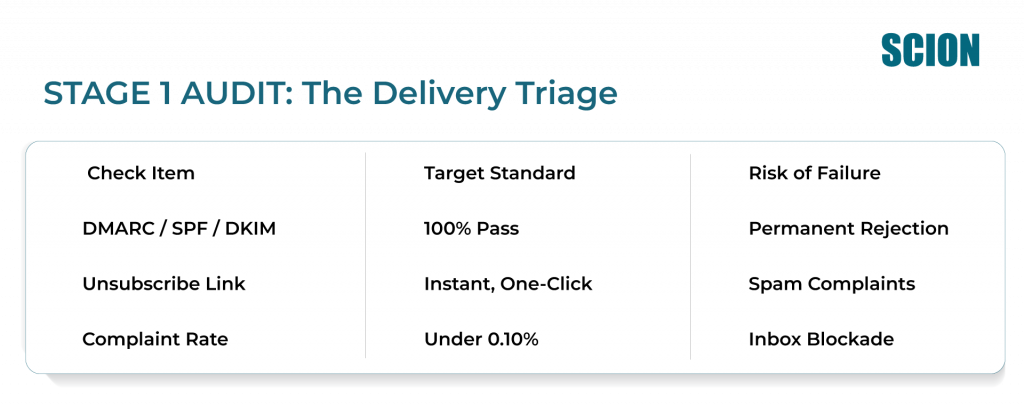
To protect users from phishing, mailbox providers like Google, Yahoo, and Microsoft enforce strict sender authentication. SPF (Sender Policy Framework) lists the mail servers authorised to send on your behalf. DKIM (DomainKeys Identified Mail) adds a cryptographic signature proving the email hasn’t been altered in transit. DMARC (Domain-based Message Authentication, Reporting, and Conformance) tells receiving servers what to do if SPF or DKIM fail.
Since late 2025, major mailbox providers have shifted from delayed filtering to permanent rejections (550 errors) for non-compliant bulk mail. Even if you send fewer than 5,000 emails a day, all-sender rules still apply. Without these records, legitimate messages land straight in the spam folder or get bounced back entirely.
How to check: Send a test email to a personal Gmail account, click the three dots, select “Show original”, and confirm that SPF, DKIM, and DMARC all read PASS. Register your domain for Google Postmaster Tools.
2. Make unsubscribing one click, and treat it as list cleaning
Hiding your unsubscribe link to artificially preserve subscriber counts is a relic of the past that backfires immediately. Major mailbox providers require a prominent one-click unsubscribe header (List-Unsubscribe) for marketing mail, and requests must be honoured within two days. When an unsubscribe link is hard to find, frustrated readers simply click “Report Spam.”
Instead, view unsubscribes as healthy list hygiene. Include a preference centre allowing subscribers to change topics or frequency rather than opting out entirely.
How to check: Look at your campaign in Gmail; ensure the native “Unsubscribe” link appears cleanly next to your sender name and works instantly without requiring a login.
(Read more about why subscribers leave in our guide).
3. Keep spam complaints under 0.1% and prune contacts who never engage
Google explicitly asks bulk senders to keep reported spam rates below 0.10% and strictly under 0.30% to maintain inbox placement. In practical numbers, that means fewer than 1 complaint per 1,000 delivered emails.
Implement a robust sunset policy: run re-engagement campaigns for dormant subscribers and automatically suppress contacts who haven’t clicked or opened over a set window (such as 90 to 180 days). Never buy, rent, or scrape contact lists.
How to check: Review your Google Postmaster Tools spam-rate dashboard and your ESP bounce/complaint reports weekly.
(Dive deeper into technical configuration with our email deliverability checklist).
Not sure if your domain passes authentication or what your complaint rates look like? Scion’s automation team can review your email infrastructure and core setups. Contact our team or explore our marketing automation services.
Stage 2 — Earn the right to email
4. Grow your list with clear consent, not volume
Sustainable email marketing relies on transparent permission. Opt-in forms should clearly state what subscribers will receive and how often. For high-value lists, use a double opt-in process where new subscribers must confirm their email address before joining.
Keep compliance front of mind: adhere to the GDPR for European contacts, CAN-SPAM in the United States, and India’s DPDP Act Rules (notified in late 2025), which mandate clear notices and verifiable consent obligations for regional processing. Always consult legal counsel for regional compliance details.
How to check: Pick 10 random contacts in your CRM. Can you pinpoint exactly when, where, and under what terms they gave explicit consent?
5. Segment by behaviour and buying stage, not just job title
Sending the exact same newsletter to your entire database destroys engagement and damages sender reputation. Start with three core segments that small teams can easily maintain: new subscribers, engaged readers, and active opportunities or clients.
Layer behavioural triggers on top of basic demographics—such as visiting pricing pages, downloading specific guides, or attending webinars.
How to check: What percentage of last month’s campaigns went to your entire list? If the answer is over 80%, refined segmentation is your next major upgrade.
Stage 3 — Be worth opening (by people and by inbox AI)
6. Treat from name, subject line, and preheader as one message
Your reader evaluates your email in a split second based on three elements working together:
1. From Name: For B2B services, sending from a real person at the company (e.g., Alex from Scion) often outperforms generic company aliases. Test this variable.
2. Subject Line: Keep it clear, honest, and promise a specific takeaway.
3. Preheader Text: Use preview text to complement—not repeat—your subject line.
Note: On modern iPhones and within AI-powered Gmail inboxes, automated AI summaries can override the preview text you wrote, making the opening lines of your email body more important than ever.
7. Write the first two lines for the AI summary
With Gemini features integrated directly into Google Workspace and Apple Intelligence managing inbox overviews, many readers now meet an AI-generated summary before they ever see your designed layout.
- Practical adjustments: State the core value proposition and call to action right in the opening sentences of your email. Use live, selectable text rather than blocks of text baked into graphic banners. Ensure all image CTAs feature descriptive alt text.
- Where AI helps vs. doesn’t: Use AI to brainstorm subject lines, draft layout variants, or summarise campaign metrics. Never let AI replace customer understanding, offer validation, or brand voice. (Read more about practical AI strategies).
- How to check: Read only the first two sentences of your latest draft. Do they immediately explain what the email offers and what the reader should do next?
8. Send when you have something useful, then set cadence by results
There is no universal “magic day” or hour to send marketing emails. Instead, build a content calendar tied directly to your business cycles. Test email frequency against your unsubscribe and complaint metrics rather than guessing. Give users granular options in your preference centre so they can choose a monthly digest instead of unsubscribing entirely.
9. Design for mobile, dark mode, and accessibility
B2B professionals often read emails on mobile devices during commutes or check desktop clients like Outlook between meetings. Design with single-column templates, large thumb-friendly buttons, and clean dark-mode colour palettes.
Accessibility practices such as high colour contrast, clean alt text, and logical text hierarchy help AI inbox parsers accurately index your content.
How to check: Send a live test email to a mobile device in dark mode and desktop Outlook before deploying any new template design.
Stage 4 — Automate the journeys that matter and measure what pays
10. Automate three journeys before you write another campaign
Instead of constantly scrambling to write one-off broadcasts, focus your energy on foundational automated sequences:
- The Welcome Series: Sets expectations, delivers lead magnets, and introduces your brand value.
- The B2B Nurture Sequence: Educates prospects over time, moving them through long sales cycles triggered by specific behaviours or CRM stages.
(Explore our deep dive on B2B email nurturing).
- The Re-Engagement Flow: Automatically attempts to wake up dormant subscribers before triggering list suppression.
- Multichannel synergy: Pair your automated nurture emails with aligned touches like LinkedIn outreach to reinforce your message.
11. Measure clicks, conversions, and revenue, not opens, and test one thing at a time
Open rates are heavily distorted by privacy features like Apple’s Mail Privacy Protection and automated AI summary pre-fetches. Shift your focus to hard engagement and downstream pipeline metrics.
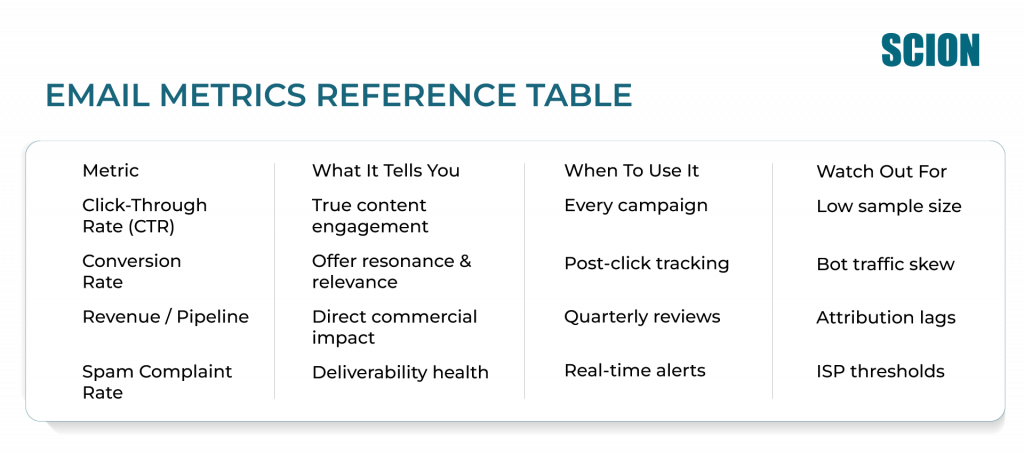
- Testing discipline: When running A/B tests, test only one variable at a time (e.g., subject line or CTA button copy), establish a clear hypothesis, and wait for statistical significance before making decisions. Ensure all links include proper UTM parameters connected to GA4 or your CRM. (Learn more about maximizing clicks on landing pages that convert email clicks).
For BNI Directors and Chapter Leaders
Regional and chapter leaders can apply these strategies immediately to drive engagement:
- Authenticate your chapter’s domain (Tip 1) so member bulletins never hit spam.
- Segment your database (Tip 5) cleanly between active chapter members, local visitors, and prospective partners.
- Automate a visitor follow-up journey (Tip 10) to guide first-time guests smoothly from meeting attendance to membership application.
Always Start with Stage 1
Fixing your email marketing doesn’t require rewriting your entire strategy overnight. Take 30 minutes to run a self-audit: check your domain authentication, review your complaint rates, and verify your opt-in forms.
Get your technical foundation delivered, earn your audience’s permission, and build automated journeys that scale.
Ready to optimize your email channels? Contact Scion Social’s marketing automation team today for an expert infrastructure check, or explore our comprehensive marketing automation services to turn your email list into a predictable revenue engine.
Email Marketing FAQs
The most effective approach is triage-based: secure your technical delivery first, earn explicit permission, write relevant and accessible content tailored for AI-summarised inboxes, and measure bottom-line conversions rather than vanity metrics.
Open rates are largely unreliable due to privacy extensions and AI pre-fetching. Instead of chasing rigid industry benchmarks, measure your open-rate trends internally over time and judge campaign success primarily by click-through and conversion rates.
A healthy click-through rate typically hovers between 2% and 5% depending on your industry, list warmth, and B2B vs. B2C model. Track click performance by segment rather than relying on generalized averages.
There is no fixed golden rule. Start with a sustainable cadence you can maintain with genuinely useful content, monitor your unsubscribe and complaint rates closely, and give users frequency controls in your preference centre.
Yes. Email remains one of the highest-ROI marketing channels available because you own your audience data. However, the bar for permission, technical compliance, and personal relevance is higher than ever.
Authenticate your domain properly with SPF, DKIM, and DMARC, implement one-click unsubscription, keep your spam complaint rate well below 0.10%, maintain rigorous list hygiene, and send content that matches subscriber expectations.
Yes. While Google’s bulk sender rules apply specific enforcement thresholds above 5,000 messages, all-sender guidelines mandate basic authentication standards. Setting up these records protects your brand from spoofing and safeguards your reputation.
AI is a powerful assistant for brainstorming subject line variants, drafting initial copy blocks, and summarizing performance metrics. It should support—never replace—deep customer understanding, brand voice guidelines, and compliance checks.
Measure success by tracking click-through rates, lead conversions, and revenue pipeline attribution. Use UTM parameters and CRM integration to connect email engagement directly to closed business.
A suppression list contains email addresses that you are legally and technically prohibited from mailing—including unsubscribes, hard bounces, and spam complainers. Maintaining this list protects your sender reputation and ensures compliance.